I Used Claude Code to Redo My Portfolio, and It Changed How I Think About Engineering
How AI-assisted development with Claude Code transformed my portfolio and reshaped my perspective on modern engineering workflows.
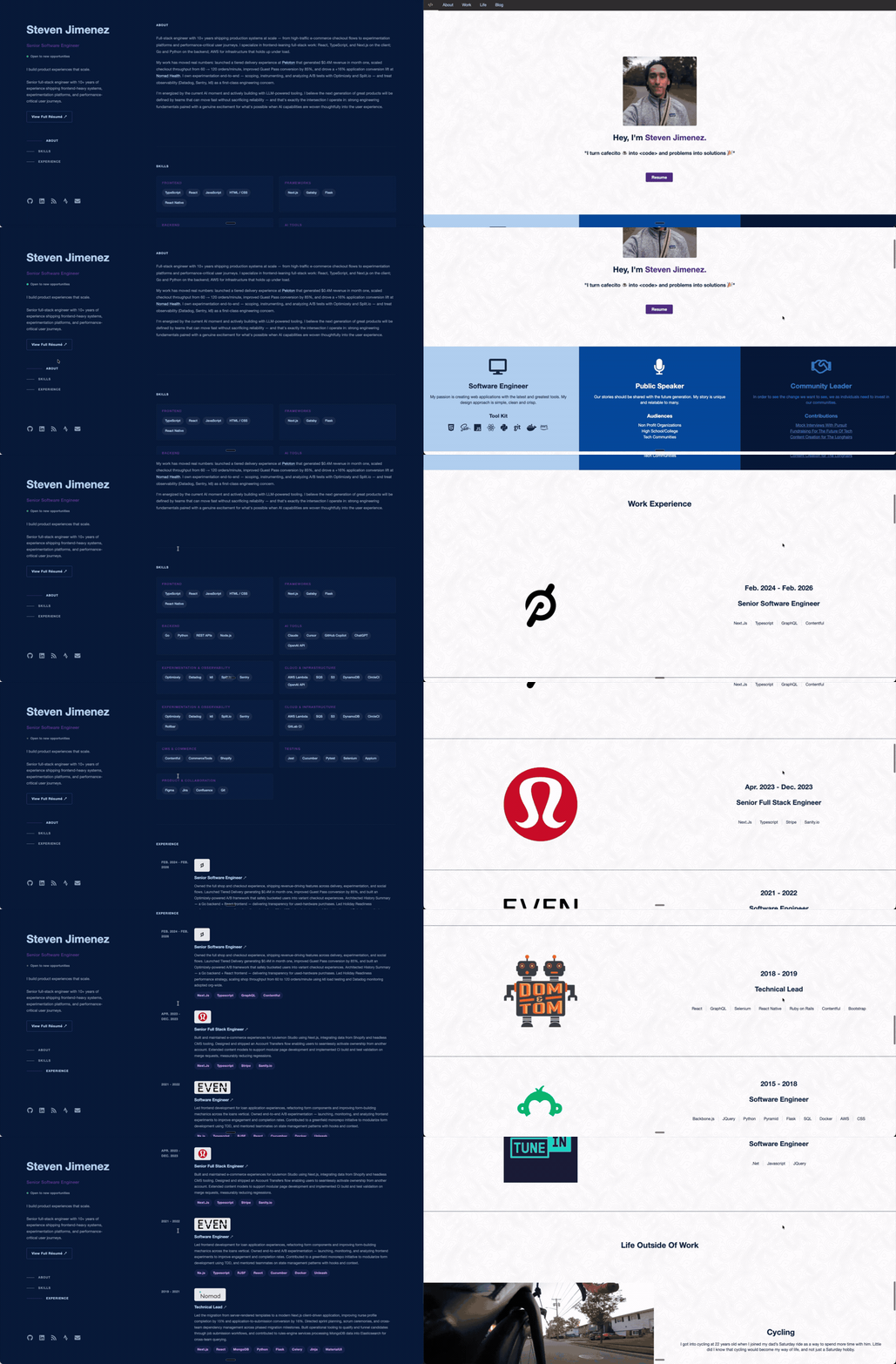
My portfolio at wepadev.com had been due for a refresh for a while. It still looked like an older version of me. The design didn’t feel modern. The photo was outdated. Some of the content reflected things I used to do, like public speaking and community work in a way that no longer matches how I show up professionally today. Even worse, my work experience section didn’t really explain my impact. It mostly listed job titles, dates, and tools.
That’s fine for a first pass. It’s not fine when you’re actively trying to represent yourself well.So I decided to redo it. But instead of treating it like a normal side project where I would manually rebuild everything myself, I used Claude Code.
Part of that decision was practical. Part of it was curiosity.
We’re clearly in a moment where AI-assisted development is becoming part of the workflow, whether people want to admit it or not. I kept seeing people talk about Claude Code, and I’m already spending time learning it through Anthropic’s courses. I’m currently going through Claude Code in Action, and rather than just passively watch lessons, I wanted to apply what I was learning to something real.
That made this portfolio redesign the perfect test case.
Why I Used Claude Code

I didn’t choose Claude Code because I suddenly forgot how to code. I chose it because I wanted to understand what it looks like to work with a tool like this in a realistic way. Not in a toy project. Not in a one-file demo. In something personal, visible, and useful.
I also wanted to see where the line is between what I should hand off and what I still need to own. That ended up being one of the biggest lessons.
I Didn’t Start With a Clear Vision
I wasn’t sitting there with a complete design system in my head. What I did have was a clear dissatisfaction with the current site and a rough sense of what I wanted the new one to do better. I wanted it to feel more modern. I wanted it to present me more as a professional engineer and less as a scrapbook of everything about me. I wanted the important stuff to be easier to see.
To get there, I looked around at modern developer portfolio styles and found a resume-style layout that inspired me. It had a clean split layout that immediately felt stronger than what I had. I wanted something in that direction, but still grounded in my own color palette and taste.
So that became the brief: modernize my current portfolio using that style as inspiration, while still making it feel like mine.
How I Actually Worked With Claude Code
Honestly, I went pretty all in. Claude Code handled a lot of the heavy lifting. It looked through my existing site, understood the current content and structure, and then helped reshape it around the new layout. It generated code, refactored code, and made a lot of the implementation changes.
After the initial pass, my role shifted.
I became more of a reviewer and decision-maker. I would look at what changed, decide what felt right or wrong, and then direct the next round of edits. I still owned the product decisions. I still owned the style decisions. I still chose what should be removed, what needed to be emphasized, and what visual direction felt right. But I was not manually writing every piece of the implementation. That is a very different feeling from traditional development.
What Impressed Me Most
The most impressive part was not just code generation.It was the way Claude Code could use tooling around the code.
Watching it use Playwright through MCP to take screenshots, inspect the site, identify where things were off, and then make updates based on what it saw was genuinely interesting. That felt much closer to a real workflow than just asking an AI to spit out a component.
I was also impressed by moments where it made a change, noticed something had broken, investigated the issue, and then fixed it. That starts to feel less like autocomplete and more like collaboration. That said, I don’t think “collaboration” means blind trust.
What Was Frustrating
The biggest annoyance was permissions.I understand why the safety model exists. I’m not even saying it’s wrong. But when you’re in the middle of trying to move fast, constantly approving actions gets tedious. There’s definitely a tradeoff between safety and flow, and you feel that tradeoff very quickly.
I also hit moments where the magic started to wear off. At one point I was trying to communicate a responsive layout change, basically that mobile should collapse to one column instead of two. Somewhere in that process, the styling broke and the page turned into something completely off from what I intended. I had to back that out.
That wasn’t the end of the world, but it was a good reminder that these tools are still heavily dependent on context quality, clarity, and good instruction. If the context gets messy or the direction gets fuzzy, the output can drift fast.
What This Changed for Me
This is where the project became bigger than a portfolio refresh. Using Claude Code made me think harder about the role of an engineer in an AI-assisted workflow.
First, token usage becomes real very fast. When you see how much context is being consumed, you start thinking differently about cost. Not everything is worth handing off. Some things are faster for me to do myself. Some things are worth the tokens because they save real effort. That cost-benefit thinking is going to matter more.
Second, code review has to evolve. On this project, I’ll be honest: I did not read every code change closely. There were a lot of them, and I was moving fast. For a personal portfolio, that tradeoff felt acceptable. In a professional setting, it is not.
That means engineering teams are going to need stronger review habits, better testing, tighter QA, and probably smaller PRs. If AI is generating bigger chunks of implementation, then the review process can’t stay casual. It has to become more intentional.
I also found myself thinking more about the surrounding tool ecosystem. If Playwright through MCP can help this much, what other MCP servers could make engineers dramatically more effective? That question feels important now.
What I’m Proud Of
I’m proud of the result. I’m also proud that I got it done in a few hours.
But more than that, I’m proud that I used the project as a way to learn instead of waiting until I felt like an expert. I think that matters. A lot of engineers are still standing at a distance from these tools, debating whether they matter. I’d rather get hands-on and build an opinion from actual use.
And one thing became even clearer to me through this process: experience still matters. I’ve been doing engineering work for over a decade, and that context changed how I used Claude Code. It helped me decide what was good, what was risky, what needed adjustment, and what was worth keeping. AI can accelerate execution, but judgment still matters. Taste still matters. Product thinking still matters.
That part doesn’t go away. If anything, it becomes more important.
Final Thought
 Redoing my portfolio with Claude Code was not just a design update. It was a preview of what engineering might look like more and more going forward: less time spent writing every line by hand, more time spent directing, reviewing, validating, and making better decisions.
I’m still learning. I’m not done with the Anthropic courses, and I want to keep pushing on this with side projects and eventually in professional environments too. But this project gave me something useful beyond a better portfolio. It gave me a clearer sense that the job is changing, and that adapting to that change is part of the work now.